
Participants. Progress. Proof.
Spend your time on people, not paperworkSimplify case management. Track progress. Prove outcomes.
One case file from intake to outcomes. A portal for every participant, a dashboard for every team member, and simplified funder reporting. Built for workforce, education, and human services programs.
Powerful AI. Optional by design. Turn it off in one click and keep every core capability.
Want to talk it through first? Book a meeting with our team.
- Free pilot to start
- Demo links usually the same business day
- Export everything to Excel
- Built for WIOA and PIRL
- WCAG 2.2 AA
- Controls mapped to SOC 2 and NIST
- Hosted in the United States
- AI off with one switch
See it in action
OutcomesPath in under two minutes
A quick look at the case file, the participant portal, funder reports, grant tracking, the Alumni Network, and pricing.
1:49 · Captions available in the player
Who it's for
Built for the program you run
One platform, set up for your work. Pick an edition and the tool catalog, status names, partner types, and report wording fit. Switch any time.
Workforce boards
WIOA case management for boards and American Job Centers, with partner referrals, employer postings, and PIRL checked before WIPS.
Learn moreColleges and CTE
Community colleges, technical colleges, and CTE programs following students from enrollment to credential, job placement, and wages.
Learn moreGovernment agencies
Counties, cities, and states running workforce, reentry, youth, and human services programs, with role-based access and audit-ready reports.
Learn moreNonprofits
Reentry, youth, skilled trades, and human services programs that need tracked referrals and funder-ready outcomes.
Learn moreReentry
County, state, and nonprofit reentry programs: housing, legal aid, supervision, and fair-chance employer referrals.
Learn moreYouth
Ages 16 to 24: youth workforce providers, school districts and career centers, and YouthBuild and Job Corps partners.
Learn moreSkilled trades training
Pre-apprenticeship and trade training. Includes the trades career tools: resume and cover letter builders, interview practice, funding check, wage data, and more.
Learn moreHuman services
Charities and agencies whose outcomes are stability first: housing, benefits, health, then work.
Learn moreRefugee and immigrant services
Employment services for refugees and immigrants: intake, English classes, credential help, job placement, and the partners who help people settle.
Learn moreVeterans
Veteran employment programs: transition, training, and job placement for veterans and military spouses, with VA and veteran service partners.
Learn moreAdult education and literacy
Adult basic education, high school equivalency, English language, and integrated education and training programs, including WIOA Title II.
Learn morePIRL reporting
Check your PIRL file for format, code, duplicate, and logic errors before WIPS does. Your file stays in your browser.
Learn moreFeatures
Everything your team needs, in one place
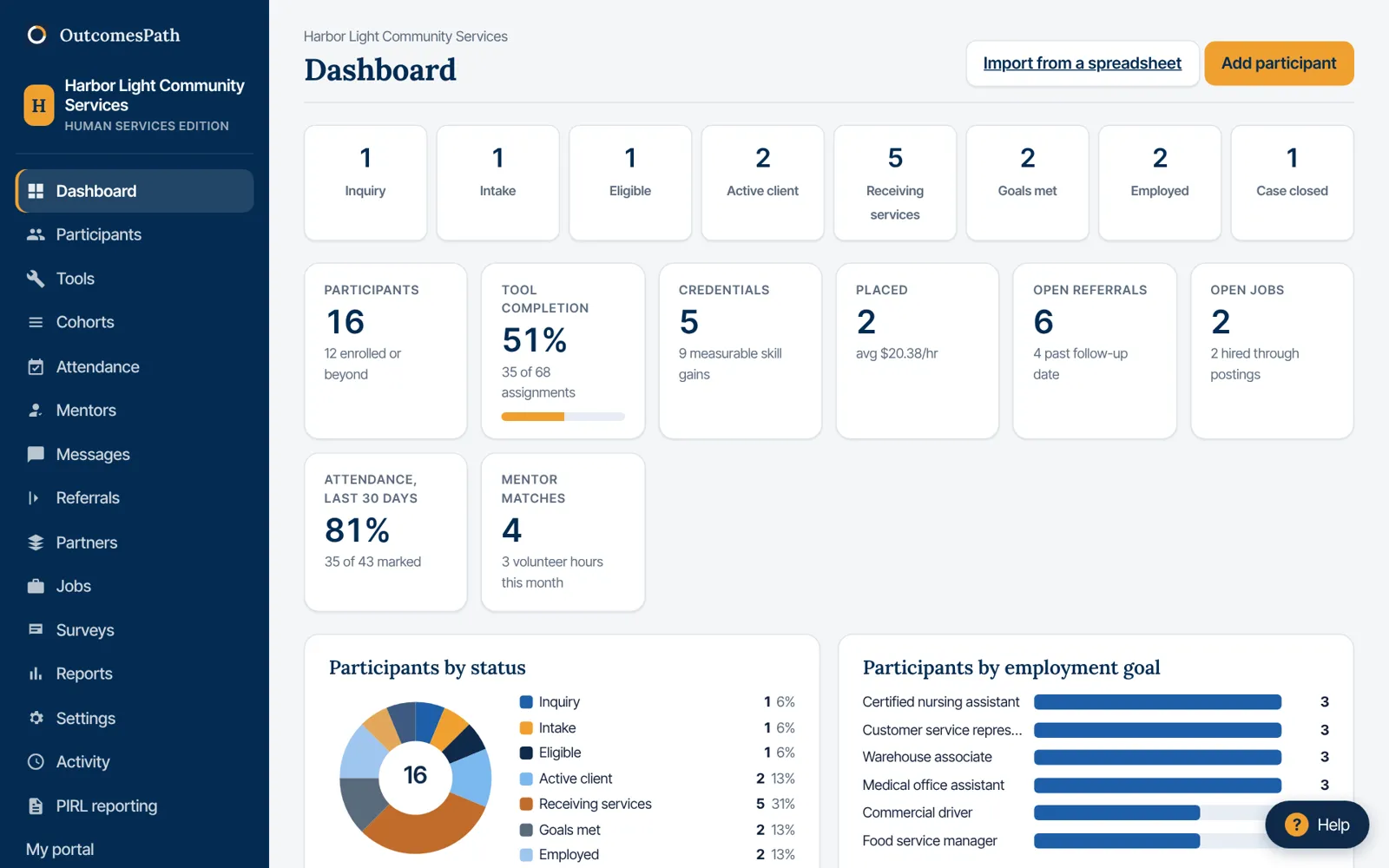
From the first inquiry to employment and retention. The same file works for a job seeker at a workforce board, a client at a nonprofit, or a student in a college workforce program. Click any feature to see it.
Casework
One case file, start to outcome
Every referral, note, and status change in one timeline, from first inquiry to retention.
See itCaseworker dashboard
Who finished, who is stuck, and which follow-ups are overdue, every morning.
See itService plans
Goals, steps, and due dates that the participant agrees to in the portal.
See itDocuments and signed forms
Upload IDs, resumes, and certificates. Consent forms are signed and time-stamped.
See itForms you build
Public application forms that arrive as inquiries, and staff forms on the case file.
See itA full enrollment form
Demographics through emergency contact, finished on a phone a section at a time.
See itAttendance with phone check-in
Two-tap attendance or a check-in code. Two misses in a row flag the dashboard.
See itMentors and volunteers
Match mentors, log volunteer hours, and collect feedback from both sides.
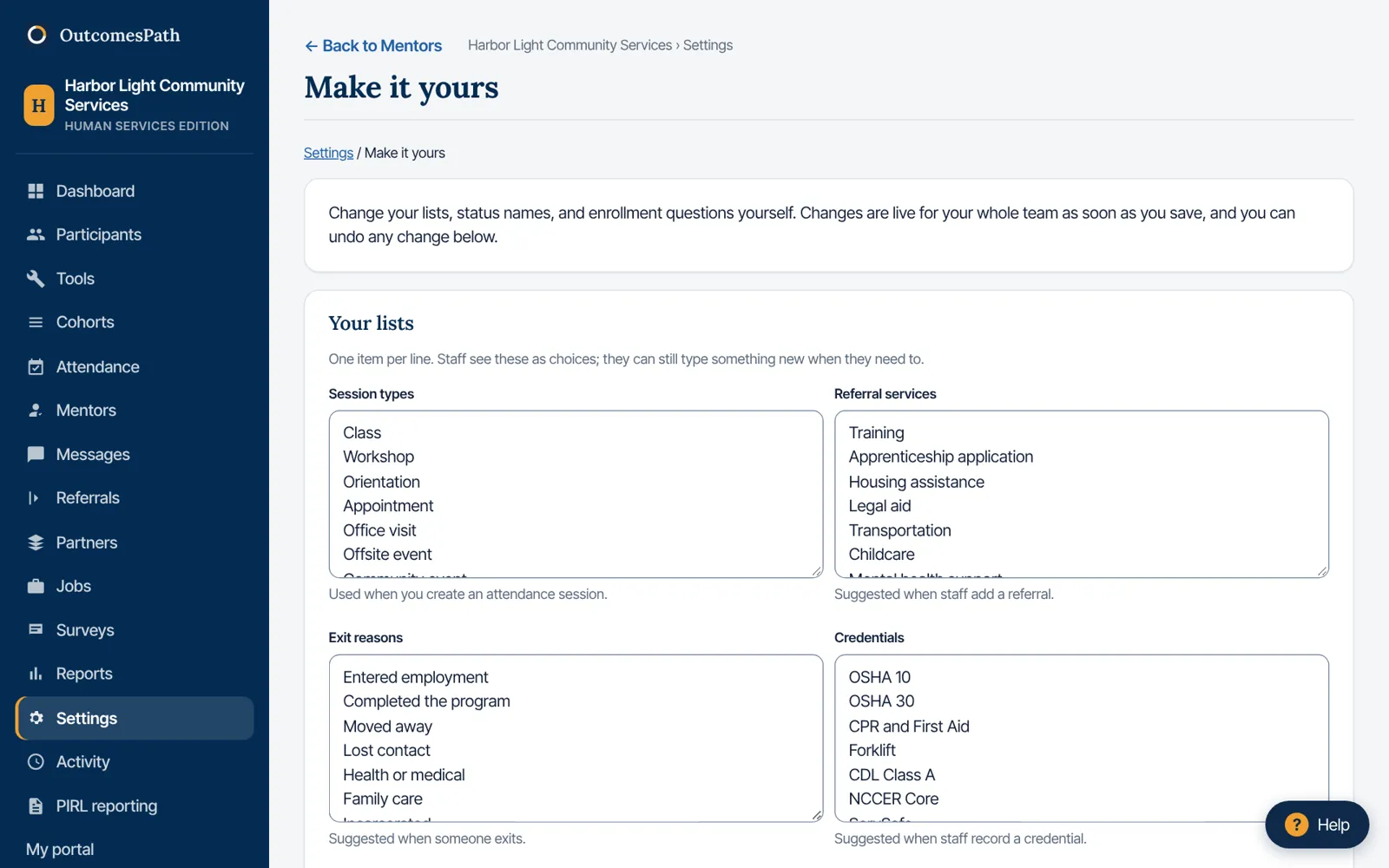
See itMake it yours
Your own lists, status names, and questions. Every change can be undone.
See itAppointments with reminders
Book time with anyone on your caseload. They get a reminder the day before, tap "I will be there", and your no-show rate is right on the page.
See itFront desk queue
Visitors sign in on a lobby tablet in English or Spanish. See who is waiting and for how long, and link each visit to a case file.
See itSecure facility mode
Start the plan, courses, appointments, and job search before release in a locked-down portal, then keep the same case file after release. Sign-in IDs for people with no email, and message review.
See itAI note assistant
Dictate or type a rough note and get a clear, factual case note to check before saving. Off until you turn it on.
See itParticipants and partners
Participant portal
A branded portal where participants do real work, and tasks mark themselves done.
See itSpanish for staff and participants
Participants switch their portal to Spanish with one tap, and each staff member can switch their own screens too.
See itSkills Library
76 illustrated life skills courses, assigned in a click and checked at the end.
See itTwo-way texting
Texts participants actually answer, with replies straight into the caseworker inbox.
See itReferrals that get tracked
Send and receive referrals with follow-up dates, outcomes, and partner logins.
See itEmployers post jobs
Employers see only interested or referred participants. Every hire is a placement.
See itThe OutcomesPath Network
Refer people to other programs that use OutcomesPath, with the person's consent, and see when they are accepted and served.
See itWorks on a weak connection
Install it like an app on a phone or laptop. A note written while offline is saved and added when the connection returns.
See itData API
Read-only keys connect your data warehouse or state system. You choose what each key can read and turn it off any time.
See itReporting and control
Reports funders accept
Credentials, jobs, wages, and retention by cohort, in Excel.
See itAsk for any report
Type the question in plain words and get the report back in Excel.
See itPIRL Pilot built in
Check PIRL files for format, code, duplicate, and logic errors before WIPS does.
See itPermission groups
Set permissions once for a team, and change everyone in it at once.
See itSupport without sharing passwords
Let support look, read only, for a few hours. Every screen is logged.
See itSingle sign-on
Staff sign in with Google or Microsoft, or with your own SAML sign-on on Enterprise plans.
See itGrant money beside QuickBooks
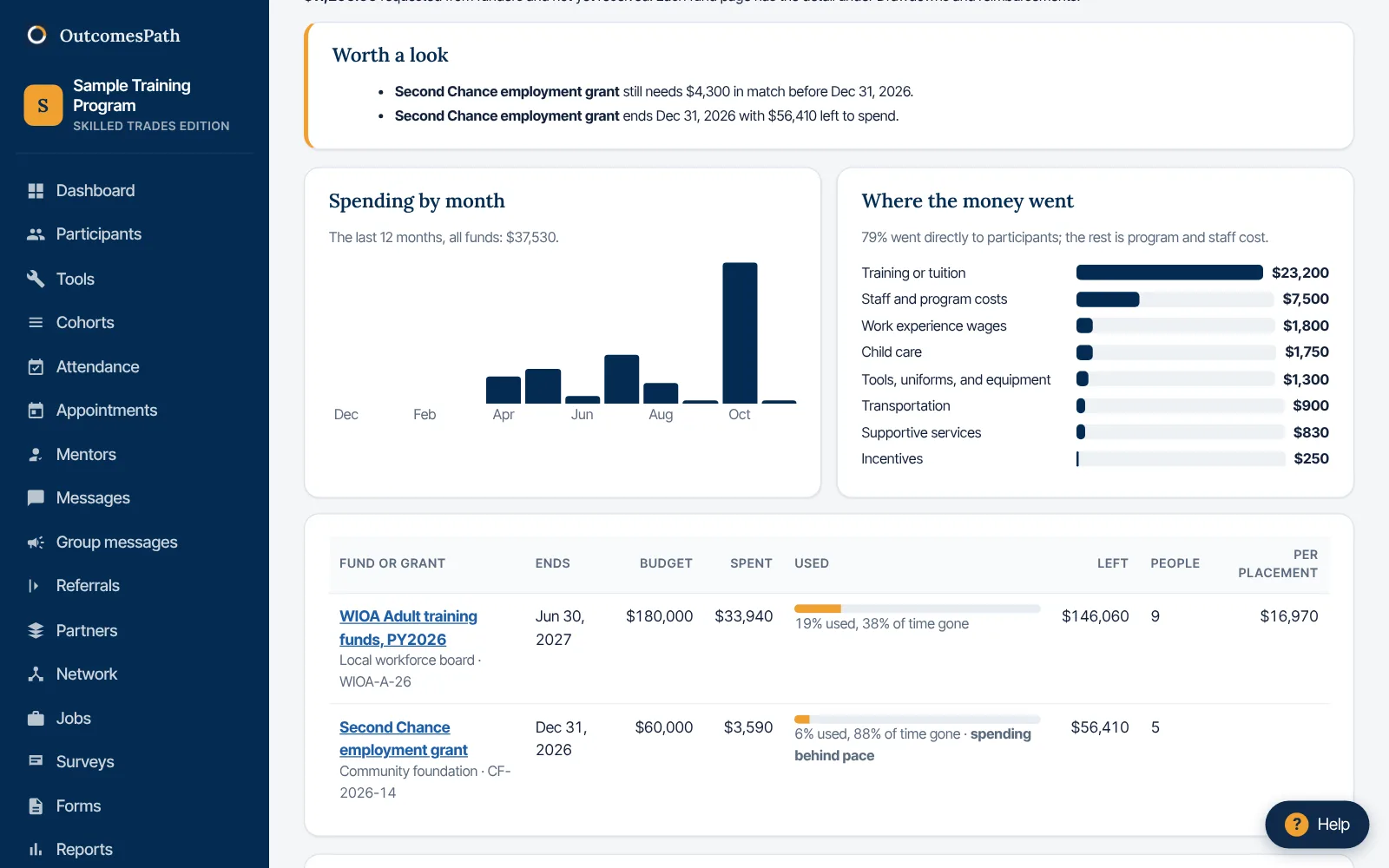
Import spending from QuickBooks, track budget lines, match, drawdowns, and subawards, approve payments, and run 22 financial reports.
See itWorkforce Pell outcomes
Completion and job placement for each short-term program against your state's targets, with a student list ready for your state report.
See itLive funder links
Send a funder or board a live results page with totals only. No names, small numbers hidden, and you turn it off any time.
See itNew: grant money beside QuickBooks
Every grant's budget, spending, and outcomes in one place
Keep QuickBooks as your book of record. OutcomesPath shows what each grant is doing: what is spent, what is left, what is owed to you, and what every credential and placement cost.
- Import spending from QuickBooks or any accounting system with an Excel export
- Budget lines, match, indirect costs, and caps per person for every grant
- Caseworkers ask for payments; an admin approves them with the receipt
- Funder report reminders, drawdowns, and subawards with partner invoices
- 22 standard financial reports and a one-click grant closeout packet
Help that does the walking
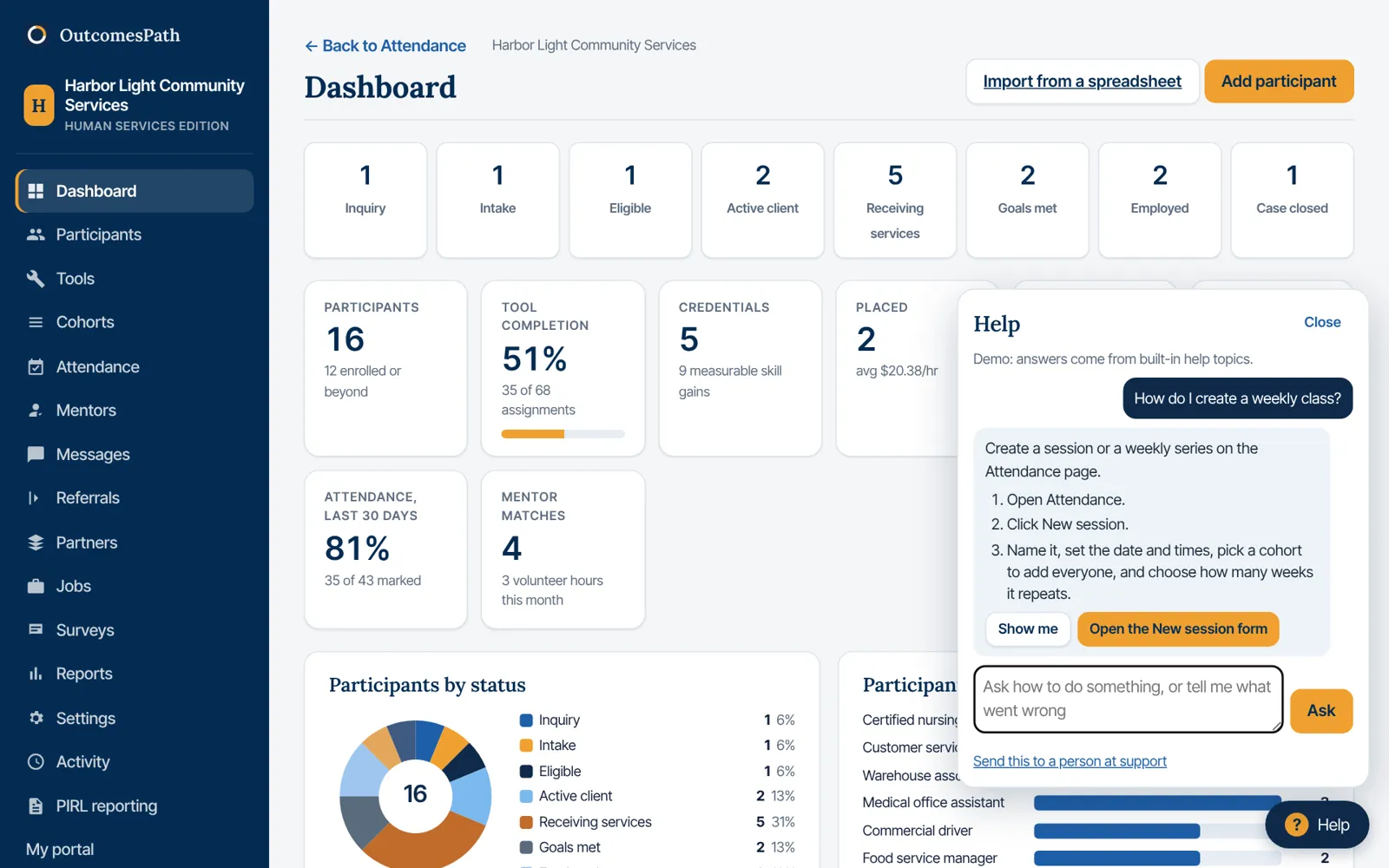
New staff are productive on day one
Ask the Help button how to do something. It answers in plain words, points at the right button, and can open the page for you.
- Show me puts a red arrow on the exact button, one step at a time
- Never sees participant records
- One click reaches a person at support
- A full illustrated user guide is built in for staff
Change it yourself
No vendor ticket for every change
Add cohorts, edit your own lists, rename statuses, and add your own questions. Shape reports by cohort and date range, or ask for one in plain words.
- Changes are live for your whole team as soon as you save
- Every change can be undone
- Import your own data from a spreadsheet
One team
Everyone works from the same page
Case management is a team effort. Each person gets the view they need, and nobody sees more than they should.
Caseworkers
One dashboard each morning: who finished what, who has been stuck for three weeks, who missed class twice, and which follow-ups are overdue. Notes, referrals, and messages live in the case file, and the Help button walks them through anything new.
Participants
Their own branded portal on a phone or computer: tasks, courses, job openings, messages with their caseworker, a phone check-in for class, and the enrollment form a section at a time.
Partners
Training providers, housing, legal aid, and other services get their own login. They see only the people referred to them, update the outcome, and refer people back in.
Mentors and volunteers
Matched with participants by your staff, with hours and feedback logged next to the case file. They need no login, and participants see only their mentor's first name and last initial.
Employers
Post openings and see only the participants who raised a hand or were referred. Every hire lands in your outcomes as a placement.
Program leaders and funders
Results by cohort and date range in Excel, a funder copy without private details, PIRL checked before WIPS, and any other report you ask for in plain words.
Getting started
Up and running in three steps
See the demo
Ask for demo access and look around three sample programs, a skilled trades program, a human services nonprofit, and a community college, with nothing to set up.
Start your free pilot
Create your organization and use every feature free during your pilot. Choose a plan when you're ready.
Bring your caseload
Import your current list from any spreadsheet in minutes. Columns are matched for you, and every row is checked before it is saved.
See what your program would save
Most programs lose hours every week to spreadsheets, retyping, and building reports by hand. Put in your own numbers and see the time and money OutcomesPath gives back, next to what it costs.
Pricing
Simple pricing, free to start
Every new organization starts with a free pilot. Then pick the plan that fits. PIRL Pilot is included in the Team, Pro, School, College, and Enterprise plans.
Every new organization starts here. Your pilot runs 90 days when you start by March 31, 2027, and 30 days when you start on or after April 1, 2027. Need longer for a proof of concept? Extend it month to month at your plan's monthly price, up to 120 days in total. Request demo access first if you want to look around.
Founding-client prices through March 31, 2027
The prices shown here are our founding-client prices. Sign by March 31, 2027 and they are held for 24 months from your start date, and guided onboarding with a trainer is included at no charge. Started a free pilot by March 31, 2027? You have until July 31, 2027 to sign at the founding price. See every difference side by side.
From April 1, 2027, new clients pay the April prices noted under each plan. Starter and School prices stay the same. Any client can also choose a 24-month price hold on the order form, at no extra charge: the prices you sign at stay the same for 24 months from your start date.
Setting up is self-guided and free: a setup checklist, a spreadsheet import, the User guide, and in-app help walk you through it. From April 1, 2027, guided onboarding with a trainer (four live sessions) is optional for a one-time fee: Starter $295, Team $595, Pro $995, College $1,500 per campus. It is included at no charge when a Starter, Team, or Pro plan is paid 12 months in advance.
Starter
For a small program getting started.
Same price after April 1, 2027
- One caseworker seat
- Up to 100 participants
- Texting available as an add-on
Team
For growing programs with several caseworkers.
Founding price. $299 from April 1, 2027
- Up to seven staff seats
- Up to 300 participants
- PIRL Pilot included
- Texting available as an add-on
Pro
For larger programs and partner networks.
Founding price. $599 from April 1, 2027
- Up to twenty staff seats
- Up to 1,000 participants
- PIRL Pilot included
- Partner spotlights: feature employers and partners on your participants' portal page
- 200 text messages a month
Need more staff seats than your plan includes? Add seats for $25 per seat, per month ($30 from April 1, 2027).
Need room for more participants? The participant add-on doubles what your plan includes: Starter to 200 for $26 a month, Team to 600 for $49 a month, Pro to 2,000 for $99 a month. From April 1, 2027: $31, $59, and $119.
Schools, colleges, and larger organizations
Billed once a year. A purchase order number can go on the order.
School
For one K-12 school or career and technical center. A district with five schools pays $7,500 a year. PIRL Pilot included, and 200 text messages a month per school.
College
For one college campus: up to 25 staff seats, 2,500 active students, PIRL Pilot, and 200 text messages a month. Each added campus is $4,500 a year. From April 1, 2027: $7,500 per campus and $5,625 per added campus. A whole college system is quoted as Enterprise.
Enterprise
Counties, states, college systems, and multi-site organizations running several programs. Single sign-on available.
PIRL Pilot on its own
Only need PIRL checking, not case management? Use PIRL Pilot by itself. What PIRL Pilot does.
PIRL Pilot monthly
Check every PIRL file before WIPS, decode WIPS rejections, and find outcomes you never reported. Three-month minimum, then month to month with 30 days' notice. $239 a month from April 1, 2027.
PIRL Pilot annual
The same tool paid once a year: $179 a month. A purchase order number can go on the order. $2,581 a year from April 1, 2027.
Alumni Network
Stay in touch with the people who finish: outcome check-ins at 3, 6 and 12 months, a way back for help, safe mentoring, stories, job leads, and volunteer hours for match. See the Alumni Network.
Added to your plan
Up to 1,500 active alumni, or $179 a month for unlimited alumni. Alumni never count against your participant limit.
On its own
The Alumni Network without case management, up to 1,500 active alumni. $399 a month for up to 5,000 and $599 for unlimited.
In your pilot
Included in every free pilot, so you can try it with real graduates before you decide.
Texting add-on
Two-way texting participants actually answer: notices, full messages by their own choice, replies straight into the caseworker's inbox, quiet hours, and STOP handled for you.
Texting Starter
500 messages a month and a dedicated number. For Starter and Team plans. One add-on covers your whole organization. $90 a month from April 1, 2027.
Texting Pro
1,500 messages a month and a dedicated number. For Pro, School, and College plans that outgrow the included 200. One add-on covers your whole organization. $239 a month from April 1, 2027.
Over your allowance
Billed monthly. No surprises: usage shows in Settings.
Ready to sign up?
Sign the Client Agreement online in about five minutes. Pick your plan, choose how you will pay (check, ACH bank transfer, or credit card; a purchase order number can go on the order), read the short agreement, and type your name to sign. We confirm your order by email, usually within one business day.
Paid plans are 12-month agreements that renew each year unless either side gives notice at least 30 days before the anniversary. PIRL Pilot monthly has a three-month minimum, then runs month to month. Monthly plans are due by the 5th of each month. You own your data and can export it at no cost when an agreement ends. Questions first? Write to support@outcomespath.com.
Refer an organization. Earn 10%.
Know a program that could use OutcomesPath? Sign up, get your referral code, and share it with them. You earn 10% of the fees your referred client pays during their first year. We pay you quarterly, after the client's payments are received. Anyone can join, client or not.
Questions
Common questions
What is OutcomesPath?
Case management software for programs that move people forward: workforce boards, government agencies, nonprofits, and colleges. It includes a participant portal, caseworker dashboard, partner referrals, employer job postings, two-way texting, PIRL checking, and funder-ready reports.
Does OutcomesPath work with QuickBooks?
Yes. Export spending from QuickBooks or any accounting system to Excel and bring it into OutcomesPath in a few minutes. Each grant then shows its budget lines, match, drawdowns, and cost per placement, with 22 standard financial reports. It is included in every plan. A live two-way QuickBooks connection can also be built to order. See how it works.
Who is OutcomesPath for?
Workforce boards and American Job Centers; county, city, and state agencies; reentry, youth, skilled trades, and human services nonprofits; and community colleges, technical colleges, and CTE programs.
How much does OutcomesPath cost?
Every new organization starts with a free pilot. Plans are Starter $149 a month, Team $249, Pro $499, School $1,500 per school per year, College $6,000 per campus per year, and Enterprise by quote. PIRL Pilot on its own is $199 a month or $2,149 a year. It covers up to 7 staff users and 1,000 participants in the quarter you report. Each added 1,000 participants is $49 a month, and when every workforce board in a state signs on, each board gets 10% off. These are founding-client prices, held for 24 months for organizations that sign by March 31, 2027, or that start a free pilot by then and sign by July 31, 2027. From April 1, 2027, new clients pay $299 for Team, $599 for Pro, $7,500 for College, and $239 a month or $2,581 a year for PIRL Pilot. Setup is self-guided and free, and guided onboarding with a trainer is an optional one-time fee for those clients. The free pilot runs 90 days when started by March 31, 2027, and 30 days after that. A pilot can be extended month to month at the monthly price of the plan, up to 120 days in total.
Is there an OutcomesPath app for phones?
Yes. OutcomesPath runs in the browser, and you can save it to an iPhone, iPad, or Android home screen, or install it on a Windows or Mac computer, so it opens from its own icon. There is nothing to download from an app store. See how to put it on your phone or computer.
Does OutcomesPath include training courses?
Yes. The Skills Library has 76 illustrated life skills and job readiness courses, every one a full course with a certificate, including a 14-course reentry series. Staff assign them in a click, and completion is recorded in the case file. It is included in every plan.
Does OutcomesPath help with PIRL and WIPS?
Yes. PIRL Pilot is built in. It checks your PIRL file for format, code, duplicate, and logic errors before you upload to WIPS, and decodes WIPS error exports.
How do we sign up and pay?
Sign the Client Agreement online. Pick your plan and pay by check, ACH bank transfer, or credit card; a purchase order number can go on the order. Paid plans are 12-month agreements, and PIRL Pilot monthly has a three-month minimum, then runs month to month. We confirm your order by email, usually within one business day.
See it with your own program in mind
Every new organization gets a free pilot. Ask for demo access and we reply by email, usually the same business day, with your links.